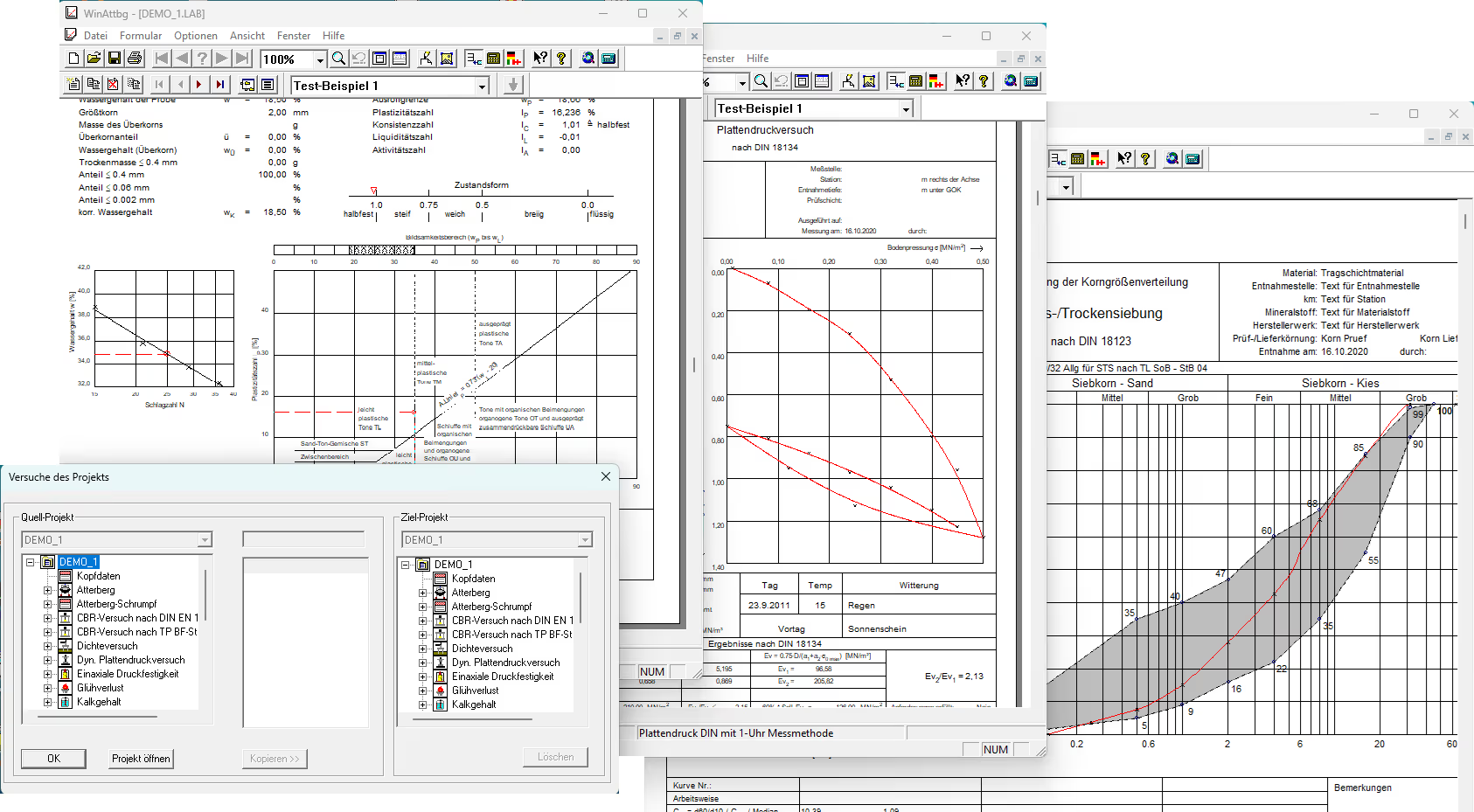
There are numerous programs available for analyzing laboratory test results. The main advantage of these programs lies in the data entry process. Data is entered directly on the screen in the respective output form. This means you always see the final form on the screen (as it will appear when printed) and enter the data directly into the respective fields. To change an entry, simply point to it with the mouse and enter the change.
General description:
* You can save multiple experiments within a project and easily select them within the project. To save time, you can copy the header data for each experiment within a project.
* The ability to save multiple experiments in a single project extends beyond the scope of any single program, as you can save experiments from different lab programs within a single project.
* You can also open multiple projects at the same time in different windows, for example, to compare the results.
* The entire manual is, of course, available as online help. You can also access help for specific sections of the form by clicking the "arrow with a question mark" button.
* Installing the programs is very easy and is done automatically by an installer.
* You can easily add your company logo and name yourself at no extra cost.
Input:
* The main advantage of these programs is the data entry process. Data is entered directly on the screen using the appropriate form. This means you always see the final form on the screen (just as it will appear when printed) and enter the data directly into the appropriate fields. To change an entry, simply point to it with the mouse and enter the change.
* Another advantage is that you have visual control and can see the results immediately on the screen. An easy-to-use zoom function is available to help you see even the smallest details on the screen.
Issue:
* The forms are printed exactly as they appear on the screen when you enter data. You can, of course, check the layout using the standard Windows print preview.
* The runs of a project (from the current program) can be printed in a batch without having to take action after each run. For some programs, the print output can be limited.
* Export functions for Excel, PDF, and various graphic formats (BMP, DXF, EMF, SVG, JPG, PNG, etc.) are also available. Bitmaps can also be saved as a cropped section to either a file or the clipboard.
* For programs that include charts, you can manually adjust the output grid.

The WinAttbg program is used to determine the Atterberg limits in accordance with DIN 18122 and DIN EN ISO 17892-12.
The data is entered into the form and can be calculated with the click of a button.
Input:
* General information about the project (such as construction project, intake point, date, etc.), which can also be copied from other projects.
* Data required to determine the yield point: number of blows, mass of the wet and dry samples, and mass of the container.
* Data required to determine the rolling limit: mass of the moist and dry samples, as well as the mass of the container.
* Natural water content
* Anteil des Durchgangs < 0.002mm.
* Data on the oversize fraction: either directly or as dry matter and the mass of the oversize fraction.
Analysis:
* Determination of the yield point using the impact test or the cone test
* Determination of the shrinkage limit
* Determining a regression line to calculate the yield point using up to 5 tests
* Option to exclude any outliers.
* If only one measurement is taken, the results are evaluated using the single-point method.
* When determining the rolling limit, a warning is displayed if the moisture content differs by more than 2%.
* Classification into floor groups according to DIN 18196
* Adjust the oversize fraction if necessary
* Determination of the plasticity index (IP), consistency index (I C), liquidity index (I L), and activity index (I A)
Issue:
* Layout check
* Full printout, including a graphical representation
* BMP export / DXF export / EMF export
* List all experiments in the project in a printout
* Choice between single-sheet and double-sheet output.
* Phase diagram
* Chart showing the range of plasticity
* Diagram for the regression line.

Determination of the CBR value in accordance with DIN EN 13286-47 or TP BF-StB Part B7.1
The data is entered into the form and can be calculated with the click of a button.
Input:
* General information about the project (such as construction project, intake point, date, etc.), which can also be copied from other projects.
* Information about the sample: identification, origin, condition, age, storage.
* Stamp details: Name, diameter, or surface area.
* Dry density and moisture content before and after irrigation.
* Penetration speed.
Experimental data:
* The time and penetration depth can be preset.
* Depending on the evaluation method (DIN or TP-BF), data on force or pressure.
Analysis:
* Determining a calibration curve based on the measurement points (weighting can be freely selected).
* If necessary, determine a turning tangent and calculate a corrected coordinate system (second X-axis below the grid).
* Determination of the CBR value.
Issue:
* Layout check.
* Complete printout, including a graphical representation.
* BMP export / DXF export / EMF export
* List all experiments in the project in a printout.
* The standard curve and turning tangent can be turned off if desired.

The WinDicht program includes various modules:
* DIN 18121: Determination of moisture content
* DIN 18125 Part 2: Determination of density
- Cookie cutter (A)
- Sand replacement method (S)
- Fluid replacement therapy (F)
- Balloon procedure (B)
- Plaster replacement method (G)
DIN EN ISO 17982-2: Determination of density
- Immersion weighing method
- Fluid displacement method
DIN 18126: Determination of the density of non-cohesive soils
The data is entered into the form and can be calculated with the click of a button.
Input:
* General information about the project (such as construction project, intake point, date, etc.), which can also be copied from other projects.
* 5 extra lines for comments
* For determining the water content in accordance with DIN 18 121, Part 1:
- Masses of the container, the moist sample, and the dry sample
* Plaster replacement methods
- Mass of the container and the moist sample
- Volume of the plaster body and ring volume
* Immersion weighing method
- Mass of the test specimen (immersed, in liquid, after leveling)
- Density (liquid, sheath material)
- Mass of the moist sample
* Fluid displacement method
- Mass of the test specimen (container, including displaced water, jacket, and test specimen after filling)
- Density (liquid, sheath material)
- Mass of the moist sample
Analysis:
* For determining the water content in accordance with DIN 18 121, Part 1:
- Water content.
- It is possible to calculate the average of the results from up to 5 sub-tests.
* For determining density in accordance with DIN 18 125, Part 2:
- Water content;
- Dry density Rho d;
- Moisture density Rho;
- corrected Proctor density
- degree of compaction achieved
- Air void content
- Pore fraction n
- Pore count e
- Saturation number Sr
- It is possible to calculate the average of the results from up to 5 sub-tests.
* For determining density in accordance with DIN 18 126 (loosest and densest packing):
- Individual dry densities
- Average dry density
- minimum number of pores
- minimal porosity
- maximum number of pores
- maximum porosity
- Storage density
- apparent bulk density
- Compaction capacity.
Issue:
* Layout check
* Print the entire document
* BMP export / DXF export / EMF export
* List all experiments in the project in a printout
* For determining density in accordance with DIN 18 126 (loosest and densest packing): You can enter up to 5 individual tests on a single form and, if desired, calculate the average of the results.

Software for analyzing permeability tests according to
Old DIN 18130-1: May 1998
* Section 7.1: Compression-permeability apparatus with static loading of the test specimen
* Section 7.2: Test in a test cylinder with risers
* Section 7.3: Testing in the triaxial cell
* Section 7.4: Test in a test cylinder
- Above and below water
- Only with surface water
Old DIN 18130-1: 1989-11
* Section 9: Fine-grained soil (constant hydraulic gradient)
* Section 10: coarse-grained soil (variable hydraulic gradient)
- Individual experiments
- Ongoing experiments
New DIN EN ISO 17982-11
* Constant pressure or flow
- Test cylinders with risers
- Triaxial cell
* Declining water level and constant underwater level
- KD device
- Test cylinder
* Falling water level and rising water table
- Test cylinder
The data is entered into the form and can be calculated with the click of a button.
Input:
* General information about the project (such as construction project, intake point, date, etc.), which can also be copied from other projects.
* Drop-down menu for various analyses in accordance with DIN 18130
* Entering general data for the test specimen, including its density, moisture content before and after the test, saturation pressure, hydraulic gradient, and details regarding the type of flow.
* Entering general test data, such as the diameter or cross-sectional area of the standpipe
* Data import from an external ASCII file is available upon request
* Test in a test cylinder
- Start time
- Time of reading: either relative to the previous measurement or absolute from the start of the experiment
- Above and below water (water level and pressure)
- Volume
* Constant pressure or flow (test cylinder with standpipes)
- Start time
- Time of reading: either relative to the previous measurement or absolute from the start of the experiment
- Readings h1 and h2
- Volume
- The hydraulic gradient can either be calculated or entered manually)
* Constant pressure or flow (triaxial cell)
- Start time
- Time of reading: either relative to the previous measurement or absolute from the start of the experiment
- Volume
- Temperature
* Decreasing head and constant water level (KD unit)
- Start time
- Time of reading: either relative to the previous measurement or absolute from the start of the experiment
- Water level or reading
* Decreasing pressure head and constant water level (test cylinder)
- Start time
- Time of reading: either relative to the previous measurement or absolute from the start of the experiment
- High water at the start time
- Headwater (water level and pressure)
* Decreasing pressure head and rising water level (test cylinder)
- Start time
- Time of reading: either relative to the previous measurement or absolute from the start of the experiment
- Inlet water level
- Height of the discharge water
Analysis:
* Determination of the permeability coefficients kf for the respective method in accordance with DIN 18130 Part 1: 1998-05, DIN 18130:1989-11, or DIN EN ISO 17892-11.
Issue:
* Layout check
* Full printout, including a graphical representation
* BMP export / DXF export / EMF export
* List all experiments in the project in a printout.
* Output can be restricted for a printer list.
* The grid scale can be set by the program or defined manually.
* Output of experimental data, including a graphical representation of the experimental procedure.
* The measured values entered can be output to a separate log.

The WinDynPl program is used to analyze a dynamic load plate test in accordance with TP BF-StB Section 8.3.
The data is entered into the form and can be calculated with the click of a button.
Input:
* General information about the project (such as construction project, measurement location, date, etc.), which can also be copied from other projects.
* 3 setting values and, if applicable, 3 speed values per measurement.
* Weather data.
* Disc diameter, diameter of the pressure stamp.
* Water accumulation under the slab, slab foundation.
* Data import from ASCII files available upon request.
Analysis:
* The evaluation is conducted in accordance with TP BF-StB Section 8.3.
* Statistical analysis.
Issue:
* Layout check
* Complete printout, including a graphical representation.
* BMP export / DXF export / EMF export
* List all experiments in the project in a printout.

Program for determining uniaxial compressive strength in accordance with DIN 18136-E.
The data is entered into the form and can be calculated with the click of a button.
Input:
* General information about the project (such as construction project, intake point, date, etc.), which can also be copied from other projects.
* Specimen dimensions (length, width, diameter, height, etc.)
* Breakage pattern, wet weight, water content at placement and removal
* Shear velocity (if applicable)
* Date and time at the start of the meter reading
* Load and settlement at the start of the measurement (zero reading)
* Either date and time, absolute time since the start of the test, or relative time to the previous measurement.
* Load and settlement
* Data import from an external ASCII file is available upon request.
Analysis:
* The evaluation is conducted in accordance with DIN 18136.
Issue:
* Layout check
* Full printout, including a graphical representation
* BMP export / DXF export / EMF export
* List all experiments in the project in a printout
* Output can be restricted for a printer list
* The grid scale can be set by the program or defined manually.
* Selection of the curve calculation method
- Compensation curve
- Splines
- Rational Bézier splines
- Line segments
* Output of experimental data, including a graphical representation of the experimental procedure.
* The measured values entered can be output to a separate log.

Test method for determining water absorption in accordance with DIN 18 132-A. This test is used to evaluate soils intended for use in construction, as well as mineral building materials intended for use as waterproofing.
The data is entered into the form and can be calculated with the click of a button.
Input:
* General information about the project (such as construction project, intake point, date, etc.), which can also be copied from other projects.
* Trockenmasse, Raumtemperatur und Anteil der Körner < 0.4 mm [%]
* Time of meter reading (can be copied from the table and edited)
* Volume of water absorbed
* Volume of evaporated water
* Calculation module for the curve can be selected.
Analysis:
* The evaluation is conducted in accordance with DIN 18132.
* The following are being investigated:
- Water absorption capacity (%)
- Assessment of water absorption capacity (very low, low, medium, high, very high)
- Assessment of plasticity (very low, slightly plastic, moderately plastic, highly plastic).
Issue:
* Layout check
* Full printout, including a graphical representation
* BMP export / DXF export / EMF export
* List all experiments in the project in a printout
* Printout of the form showing the input values, the calculated results, and the moisture content curve on a single sheet
* The grid scale can be set by the program or defined manually
* Selection of the curve calculation method
- Compensation curve
- Splines
- Rational Bézier splines
- Line segments

Program for determining the loss on ignition in accordance with DIN 18128-GL.
The data is entered into the form and can be calculated with the click of a button.
Input:
* General information about the project (such as construction project, intake point, date, etc.), which can also be copied from other projects.
* Mass of the container with the sample before and after annealing, mass of the container
* It is possible to calculate the average of the results from up to 5 sub-tests.
* 5 extra lines for comments.
Analysis:
* The evaluation is performed in accordance with DIN 18128.
Issue:
* Layout check
* Print the entire document
* BMP export / DXF export / EMF export
* List all experiments in the project in a printout.

Program for determining the lime content in accordance with DIN 18129_G.
The data is entered into the form and can be calculated with the click of a button.
Input:
* General information about the project (such as construction project, intake point, date, etc.), which can also be copied from other projects.
* Dry weight, temperature, air pressure, volume at the end of the test
* Upon request, volume after 30 seconds to determine the calcite and dolomite content
* The 30-second timer can be adjusted as desired
* 5 extra lines for comments.
Analysis:
* The evaluation is conducted in accordance with DIN 18129.
Issue:
* Layout check
* Print the entire document
* BMP export / DXF export / EMF export
* List all experiments in the project in a printout.

Program for evaluating compression tests with restricted lateral expansion (Oedometer test, KD test), in accordance with the following standards:

* E DIN 18135: June 1989
* E DIN 18135: June 1999
* DIN 18135: April 2012
- Calculation using the tangent
- Calculation using the secant
* DIN EN ISO 17892-5: August 2017
The data is entered into the form and can be calculated with the click of a button.
Input:
* General information about the project (such as construction project, intake point, date, etc.), which can also be copied from other projects.
* Entering specific sample data such as the sample's diameter and height, lever ratio, moisture content, and water-holding capacity.
* The actual measurements (date, time, weight, settlement)
* Automatic import from an external ASCII file is available upon request
* The measured values can be corrected manually at a later time, for example, to correct errors that occurred during the experiment.
* Identical settlement values for a load stage can be eliminated.
* Select whether the stiffness modulus should be determined at a single point or over a range.
Analysis:
* First, you can specify the stresses σ at which the respective stiffness coefficients E and S are to be determined.
* A distinction is made here between initial loading and reloading.
* Stiffness values can be determined at a single point or over a range.
* Distinguish whether the time value refers to the test height or to the maximum settlement of the respective load stage.
Issue:
* Layout check
* Full printout, including a graphical representation
* BMP export / DXF export / EMF export
* List all experiments in the project in a printout
* The print scope can be limited (even when using a printer list)
- Pressure-set diagram
- Time allocation for each training session
- Timing for each load stage (separately for loading and unloading)
- Summary table of the individual load stages
- Output of the stiffness module
- Minutes
* The grid scale can be set by the program or defined manually.
* Complete set of experimental data, including a graphical representation of the experimental process.
* Scale graduations available with either linear or semi-logarithmic axis divisions.
* Display the pressure curve using either Bézier splines or straight line segments.
* Display the timing curve using either Bézier splines or straight line segments.

The WinKorn program includes various modules:
* Determination of wet/dry sieving in accordance with DIN 18123
* Determination of slurry analysis in accordance with DIN 18123
* Determination of a combined sieve/slurry analysis in accordance with DIN 18123
* Determination of a combined sieve/slurry analysis
- Sieving in accordance with DIN 18123
- Slurry testing in accordance with DIN 19683 (determination according to KÖHN)
* Area inspection in accordance with ZTVT StB 95
* Multiple output: Multiple curves in a single chart
* Determination of a material mixture
* Long-term monitoring according to TL SoB
The data is entered into the form and can be calculated with the click of a button.
Default settings:
* Sieve sets
* Calibration curves for hydrometers
* Fixed deadlines for sludge analysis
* Sieve sets for determination according to KÖHN (DIN 19683)
* Custom definition of grain passages (for determining the effective grain diameter)
* Area curves according to ZTVT StB-95
* Customizable title lines.
Input:
* General information about the project (such as construction project, intake point, date, etc.), which can also be copied from other projects.
* Screening in accordance with DIN 18123
- Evtl. Abtrennung der Feinanteile < 0.063 mm
- Dry matter can be determined using a test sample
- Loading a defined set of screens.
- Weight in grams
- Single entry
- Enter total
- Possible subset from any sieve
- Indication of residue in the shell
- Specification of the maximum grain size
* Slurry testing in accordance with DIN 18123
- Select whether dry weight is determined by drying or by underwater weighing.
- Dry matter can be determined using a test sample
- Selection of a predefined hydrometer
- Selection of meniscus repair
- Importing a defined time data set for reading the hydrometer
- Hydrometer reading (R' = (r' - 1) * 10³)
- Room temperature
* Slurry testing in accordance with DIN 19683 (KÖHN)
- Selecting a predefined filter set
- Weighing
- Mass of the dispersing agent
- Passing through each screen
Combined sieve/slurry analysis
- When creating a new one, existing screens and slurries can be carried over
- Determining the transition from slurry to screening
Adapted for a 0.125 mm sieve (DIN)
Adjustment to 0.063 mm screen (DIN)
Conducting a joint rehearsal
Qualitative fit to the sieve curve
- When calculating using a compensation curve, the transition can be weighted differently.
* Area inspection in accordance with ZTVT StB 95
- Selecting a range curve
- Possible verification of intermediate values
* Multiple outputs
- Select up to 5 grain curves from the current project
- The most important calculation parameters (grain index, CC, U, t, kf, etc.) are displayed below the graph for each curve.
* Determination of a material mixture
- Selection of two to six grain size distributions for the current project
- The percentage composition of the mixture can be calculated or entered below the graph for each curve.
* Long-term monitoring according to TL SoB
- Selecting multiple curves
- Selection of two range curves (SDV and General)
- Selecting a difference check
- Selection of a target curve, including a tolerance range.
Analysis:
* Selection of the method for calculating the grain curve
- Compensation curve
- Splines
- Rational Bézier splines
- Line segments
* Determination of
- kf value according to Hazen, Bialas, Beyer, Seelheim, or Sailer
- Grain index
- Fraction of the grain index in %
- Irregularity index (d 10, d 60, C C, U)
- Any mesh sizes (e.g., d 10, d 20, d 30 …)
- Calculation values according to DVGW W113 (d g, F g, D s, n)
* Screening in accordance with DIN 18123
- Upon request, distribution of the sieve loss across all sieves
* Slurry testing in accordance with DIN 18123
- Evaluation in accordance with DIN 18123 (1983–04)
- Evaluation in accordance with DIN 18123 (1996–11)
* Combined sieve/slurry analysis
- Various options for aligning the slurry curve with the screen curve
- When represented by a compensation curve, the transition can be given a lower weight.
* Determination of a material mixture
- Evaluation in accordance with DIN 18123 (1996–11)
- Area verification based on custom-defined area curves
* Long-term monitoring according to TL SoB
- Verification of compliance with the applicable regulations.
* Calculations according to AASHTO / UCSC
* Grain size group according to DIN 4924
* Floor assembly in accordance with DIN 18196
* Soil type by
- DIN EN ISO 14688-1
- DIN 4023-1
* Parameters according to
- DIN EN 12620
- DIN EN 13242
Issue:
* Layout check
* Full printout, including a graphical representation
* BMP export / DXF export / EMF export
* List all experiments in the project in a printout
* Output can be restricted for a printer list
* Screening or slurry data on separate reports
* Check of the range curve with a comment (range exceeded or not met)
* Various output formats
- Foundation work (specify the extraction point)
- Road construction (specification of origin, test or delivery grain size, etc.)
* Output of the percentage shares of the grain classification index (with and without subdivisions)
* Output of calculation values in accordance with DVGW W113
* Display of predefined percentage values along with the corresponding grain diameters
* Separator in the grain code
* Various mesh sizes available
- 0.001 mm to 100 mm
- 0.06 mm to 100 mm
- 0.06 mm to 500 mm
* Can be enabled upon request:
- Frost criteria according to Schaible
- Damage classes
- Median as a hatched pattern
- Sections for floor assemblies
- Screen sets
- Different symbols for measured values in cases of multiple outputs
- When mixing a blend of materials, display the feed curves
*For long-term monitoring: A report on all tested curves, indicating which curves comply with the specifications and the percentage of curves that do so.

The WinPlatt program is used to analyze a load plate test in accordance with DIN 18134.
Also included:
* ÖNorm B 4417 ( Austrian standard)
* SN 670 317a ( Swiss standard).
The data is entered into the form and can be calculated with the click of a button.
Input:
* General information about the project (such as construction project, measurement location, date, etc.), which can also be copied from other projects.
* Pressure gauge readings: Customizable load step sequences or free-form input.
* Settings: Two input options:
- Single-point measurement method with automatic consideration of the measurement arm ratio.
- Three-o'clock measurement method.
* Weather data
* Plate diameter, diameter of the printing die
* Water accumulation under the slab, slab foundation
* Setting target values (target values can be compiled in a file)
* Ability to automatically import measurement data from a data acquisition device running a compatible IDAT program.
* Data import from ASCII files available upon request.
Analysis:
* The evaluation is performed in accordance with DIN 18 134 from June 2001-9 (second-degree polynomial).
* The moduli of elasticity Ev1, Ev2, and possibly Ev3 are calculated, as well as the ratio Ev2/Ev1.
* Evaluation in accordance with the Austrian standard (B4417) and the Swiss standard (SN 670 317a).
Issue:
* Layout check
* Full printout, including a graphical representation
* BMP export / DXF export / EMF export
* List all experiments in the project in a printout
* The grid scale can be set by the program or defined manually.

Software for evaluating the Proctor test in accordance with DIN 18 127.
The data is entered into the form and can be calculated with the click of a button.
Input:
* General information about the project (such as construction project, intake point, date, etc.), which can also be copied from other projects.
* Automatic generation of data for the test boundary conditions based on the Proctor pan size.
* Compiling your own list of Proctor pots
* Data on oversize fraction and grain density of the Proctor sample
* Multiple Proctor tests: Data for determining the moisture content.
* Outliers can be excluded from the calculation.
* Determination of up to three saturation curves and up to three air void content curves.
* Entry of up to 5 external cylinder samples (entered directly or calculated via a dialog box)
* Specify the compaction levels at which the minimum and maximum moisture content are to be determined.
* 4 extra lines for comments
* Specify up to two comparison curves (from the same project).
Analysis:
* The evaluation is performed in accordance with the latest DIN standard. The Proctor curve is calculated, from which the optimal dry density and the corresponding optimal moisture content are determined.
* Users can also calculate and display the desired saturation or air void content curves.
* It is possible to exclude individual Proctor test results from the calculation of the Proctor curve.
* Automatic determination of the minimum/maximum water content for a given Proctor density.
Issue:
* Layout check
* Full printout, including a graphical representation
* BMP export / DXF export / EMF export
* List all experiments in the project in a printout
* Output can be restricted for a printer list
* The grid scale can be set by the program or defined manually.
* Two additional curves can be included in the output sheet
* Additional display of saturation lines or lines indicating air void content.
* Input of up to 5 external cylinder samples (entered directly or calculated via a dialog box) into the diagram.
* The measured values entered are recorded in a separate log.

Program for determining grain density:
in accordance with DIN 18124:
* Determination using an air pycnometer
- dried sample
- moist sample
* Determination using a wide-mouth pycnometer
in accordance withDIN EN ISO 17892-3:
* Determination using a capillary pycnometer
- Measurement of the volume of the pycnometer
- Use of the pyknometer's calibration volume
* Measurement using a gas pycnometer
The data is entered into the form and can be calculated with the click of a button.
Input:
* General information about the project (such as construction project, intake point, date, etc.), which can also be copied from other projects.
* 5 extra lines for comments
* Determination using a capillary pycnometer
- Mass of the pycnometer
- Mass of the pycnometer with the sample
- Mass of the pycnometer with the sample and water
- Water temperature
- Calibration volume of the water, or
- Water temperature (without sample)
- Mass of the pycnometer filled with water but without the sample
* Determination using an air pycnometer
- Mass of the pycnometer with and without the sample
- Pressure gauge readings
- Volume from the calibration table
- Water content or water addition
* Determination using a wide-mouth pycnometer
- Mass of the pycnometer with its bowl
- Mass of the pycnometer, including the bowl and the sample
- Water temperature
- Mass of the pycnometer containing water and the sample
- Weigh the pycnometer with water.
Analysis:
* Determination using a wide-mouth pycnometer in accordance with DIN 18124.
* Determination using a capillary pycnometer in accordance with DIN 18124.
* Determination using an air pycnometer in accordance with DIN 18121, Part 2.
Issue:
* Layout check
* Print the entire document
* BMP export / DXF export / EMF export
* List all experiments in the project in a printout

Software for evaluating shear tests in accordance with DIN 18 137 Part 3 and DIN EN ISO 17892-10:2019-04.
The data is entered into the form and can be calculated with the click of a button.
Input:
* General information about the project (such as construction project, intake point, date, etc.), which can also be copied from other projects.
* Entering specific test data
- Sample designation, normal force, consolidation force, consolidation duration
- Dimensions of the sample
- Initial and final water content, shear gap, load/displacement control.
- Type of shear, load increase, or shear velocity
- Select whether to enter the time and date, the absolute time since the start of the test, or the relative time relative to the previous measurement.
* The actual measured values (time, shear stress, shear displacement, settlement)
* Automatic import from an external ASCII file is available upon request
* These values can also be corrected manually at a later time, for example, to correct errors that occurred during the experiment.
Analysis:
* Up to six individual measurements can be combined into a single analysis.
* A graph shows the variation of shear stress τ with shear displacement.
* In a second diagram, the maximum shear stress τ is plotted above the normal stress σ.
* From this, the friction angle φ', the cohesion c', and the total shear strength φ" are determined by drawing a fitting line.
Issue:
* Layout check
* Full printout, including a graphical representation
* BMP export / DXF export / EMF export
* List all experiments in the project in a printout
* The print scope can be limited (even when using a printer list)
- Voltage versus shear displacement graph
- Diagramm Setzung über Scherweg
- Tau-over-Sigma diagram
- Experiment report with measurement data
* The scale can be taken from the program for each grid or defined manually.

Software for analyzing triaxial tests. Options:
in accordance with DIN 18 137, Part 2:
* D - Experiment
* CU test
* UU test
* CCV – Trial
in accordance with DIN EN ISO 17892-8 / DIN EN ISO 17892-9:
* CIU test
* CAU Experiment
* CID test
* CAD experiment
* UU test
The data is entered into the form and can be calculated with the click of a button.
Input:
* General information about the project (such as construction project, intake point, date, etc.), which can also be copied from other projects.
* Entering specific test data
- Sample name
- Dimensions of the sample
- Dry matter and bulk density
- Initial and final water content
- Shear rate
- Saturation pressure and cell pressure
- Duration of consolidation and change in volume
- Pore water pressure
- Behavior of the sample (swelling, fracture)
- Select whether to enter the time and date, the absolute time since the start of the test, or the relative time relative to the previous measurement.
* Upon request, provide data for the B-test: a maximum of five pairs of values for σ3 and B. The B-test is used to check for saturation: B = Δu/Δσ3.
Information on the saturation and consolidation phases, upon request
* Initial reading of the experiment, as well as the start time and date
* The actual measured values (depending on the test selected): time, Δh, force, pore water pressure, σ3, and, if desired, volume change ΔV
* Automatic import from an external ASCII file is available upon request
* These values can also be corrected manually at a later time, for example, to correct errors that occurred during the experiment.
Analysis:
* Up to 10 individual measurements can be combined into a single analysis. Depending on the model, the following graphs can be displayed:
- Diagram showing Mohr's stress circles
- Diagram showing voltage paths
- Other graphs (depending on the experiment selected)
(σ1–σ3)/2 over ε1
ΔV/V0 over ε1
Δu over ε1
σ1'/σ3' over ε1
σ3 over ε1
* Other examples include Mohr's stress circles and stress paths.
* If desired, the shear parameters b´ and a´ can be calculated by the program, from which φ´ and c´ can then be determined.
* There are several methods available for determining the shear lines:
- Average of all lines
- Enveloping line
- Selection of 2 measurement series
- Specify the shearing parameters.
Issue:
* Layout check
* Full printout, including a graphical representation
* BMP export / DXF export / EMF export
* List all experiments in the project in a printout
* The print scope can be limited (even when using a printer list)
- Diagram showing Mohr's stress circles
- Diagram showing voltage paths
- Other graphs (depending on the experiment selected)
(σ1–σ3)/2 over ε1
ΔV/V0 over ε1
Δu over ε1
σ1'/σ3' over ε1
σ3 over ε1
- Log output
* The scale of each grid can be set by the program or defined manually.